
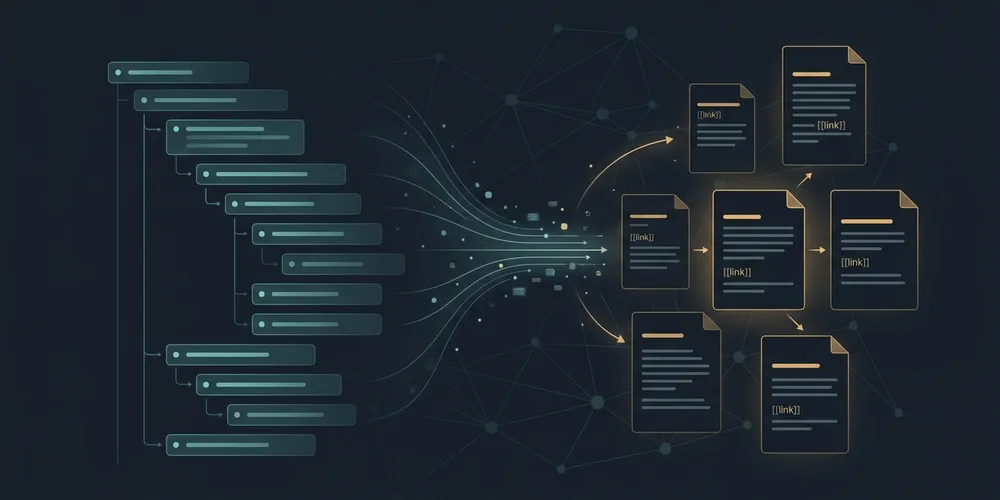
Finding My Perfect PKM Fit: The Journey from Logseq to Obsidian
I’ve been meaning to write about my Personal Knowledge Management (PKM) setup for a while. For the longest time, I have been heavily invested in Logseq. I love the daily logging flow and the outline-oriented structure. Although I still use it today and haven’t completely migrated away, the outline model started to clash with how I wanted to organize and retrieve certain thoughts. I wanted to move towards a more document-centric system for some parts of my vault.
Naturally, I looked at Obsidian. But there was a catch: Logseq and Obsidian have fundamentally different mental models.
Restructuring hundreds of outline-based daily journals into proper Obsidian pages by hand wasn’t something I wanted to spend my weekends doing. (I am lazy, and that’s usually when I start automating things). So, I decided to write a migration tool, which I published as logseq-to-obsidian. The name highlights the initial focus of the project—getting my notes from Logseq to Obsidian—though it has since evolved to target other tools as well.
My Logseq Workflow: Outlines and Namespaces
To understand why a migration is tricky, it helps to see how content is structured. Logseq organizes everything into two main folders out of the box:
- Journals (
journals/): Every day gets a file namedYYYY_MM_DD.md. Within these daily logs, I categorize my entries using second-level headings combined with specific hashtags:- ## #learningsfor technical notes and realizations.- ## #achievementsto keep track of milestones.- ## #highlightsfor notable events, articles, or podcasts.- ## #linksfor useful bookmarks.
- Pages (
pages/): These are non-journal notes. Instead of folders, Logseq uses namespaces—separated by___in the filename (e.g.,projects___personal___learning nix.mdorlearnings___kubernetes.md) and by/in wikilinks (e.g.,[[projects/personal/learning nix]]).
This outline-oriented and hashtag-based structure is fast to write, but it spreads notes and categories across hundreds of journal files. While I also had pages for longer entries in the pages folder, the choice of what went into a journal vs. a page felt arbitrary.
The Breaking Point: Sync Woes and Software Lifecycle
To be clear, it wasn’t the outline format itself that drove me away—I was actually quite happy with that model. The real trigger was the health of the software ecosystem and syncing.
I was using Logseq’s official sync functionality, but it broke on more than one occasion—and by broke, I mean it corrupted my data. I lost content in the middle of syncing cycles with absolutely no visibility. There were no logs to diagnose what went wrong, and no built-in revert mechanism to recover what was lost—and when it comes to personal notes, even a single instance of data loss is too many. Because releases were rare, fixes took a long time to arrive. At one point, the app ran on an insecure, outdated version of Electron, which triggered constant OS-level security warnings until a patch finally rolled out.
The mobile experience added to the friction. The Android app isn’t even available in the Google Play Store anymore, forcing manual APK installations. It has been a long time since a full stable version was released, which slowly eroded my trust in its syncing capabilities.
After getting burned by sync conflicts and data scares one too many times, I started looking into alternatives like Obsidian. Knowing I could just fall back on standard Git version control for my files (in addition to standard cloud sync setups) offered a level of reliability and peace of mind that a proprietary sync service couldn’t match.
The Outline vs. Document Dilemma
In Logseq, everything is a block in an outline. You open your journal, write bullets, indent them, and tag them. It’s quick, but it leads to highly fragmented notes. In Obsidian, the unit of organization is a markdown document.
If you just copy Logseq files straight into an Obsidian vault, the lack of hierarchy and the bullet-indentation syntax make the notes hard to read and navigate. I wanted to extract specific sections from my daily notes—like Learnings, Achievements, and Highlights—and transform them into clean, standalone markdown files in dedicated folders.
For example, a bullet under #learnings in Logseq like:
- learned about CSS grid layout behavior in Safari
- it behaves differently when using flex containers inside it…
Should become a clean page in Obsidian under a Learnings/ folder, titled CSS grid layout behavior in Safari.md, with the sub-bullets converted to clean markdown paragraphs.
The Hunt for the Right Vault Model
While trying to decide if Obsidian is the right fit, I keep looking for other tools that might better match my workflow. Obsidian is appealing because it is highly generic and flexible, especially with its extensive plugin system. But the flipside is that the community plugin ecosystem can feel outdated, and plugins don’t always keep pace with core updates in Obsidian itself. This makes a strong case for a more opinionated ecosystem—but only if that opinionated model actually aligns with how you work.
This is why I took brief detours exploring tools like Tana (which I liked, but its API paywall on the free tier made it a non-starter), Blinko (a fast self-hosted option, but the workflow never quite clicked), and Capacities (where I ran into API and integration barriers).
Ultimately, I focused on Obsidian, but I also wanted to support Tolaria, an opinionated local-first markdown system that matches my aesthetic preferences. The migration tool was built to natively convert to both.
Designing a Decoupled Parser and Converter Pipeline
When I started this project, I was mostly “vibe-coding” (just writing code until it worked without worrying too much about the structure). But as I added support for multiple target platforms and more complex block extraction rules, the code quickly became a tangled mess.
To clean it up, I decided to refactor the project into a proper Python package with a clear separation of concerns. I decoupled the parsing logic from the target-specific formatting. Here is how the src/logseq_converter/ directory is structured:
src/logseq_converter/
├── logseq/            # Core parser & AST models
│   ├── models.py      # LogseqPage, LogseqBlock dataclasses
│   └── parser.py      # Parses markdown outlines
├── obsidian/          # Obsidian-specific output logic
│   └── converter.py   # Writes files and rewrites wikilinks
├── tolaria/           # Tolaria-specific output logic
│   └── converter.py   # Formats for modular flat-file structure
└── cli.py             # CLI entrypoint and dependency injector
The Design Decisions
- Intermediate AST Representation: The core parser in
logseq/parser.pyreads the Logseq journal and page files into clean Python dataclasses defined inlogseq/models.py(LogseqPage,LogseqBlock) representing the hierarchical block relationships. Target converters (likeobsidian/converter.pyortolaria/converter.py) consume this intermediate representation rather than parsing raw files directly. - Polymorphic Converters: Each target ecosystem is encapsulated in its own module. Adding support for a new PKM tool (like the experimental Tana or Blinko modules) just means implementing a new converter subclass without touching the core parsing logic.
- Link and Reference Resolution: Logseq’s internal block references (e.g.
((block-id))) are resolved during the parsing phase. The target converters are then responsible for translating these references and rewriting Logseq’s namespace-separated links (like[[projects/personal/learning nix]]) into the format expected by the target tool. - Dependency Management and Testing: I adopted
uvto manage dependencies and setup my environment. This made it incredibly fast to run my test suite (usingpytest), which validates everything from basic outline parsing to property filter transformations and empty file skipping.
In my next post, I’ll talk about how I solved the hardest part of this migration: generating clean, human-readable file names for the extracted sections using local LLMs.
Have you migrated between PKM tools recently? What did you end up building to make the transition easier? Let me know!